Technical
AI Skills vs MCP: When to Use What
A practical guide to AI agent skills and the Model Context Protocol. What each one is, what it costs you in context, and how to pick the right one without overthinking it.
On this page
If you build with agents, you have probably been asked the same question a dozen times this year. Should I write a Skill for this, or wrap it in an MCP server? Both extend what an agent can do. Both come from the same Anthropic playbook. Both have loud fan bases on the timeline.
The line between them is actually pretty crisp once you see it. This is the short version, with examples, so you can stop guessing.
The 30-second answer
Skills teach your agent how to do a task well. MCP gives your agent access to systems it would not otherwise reach. That is the whole frame.
If the gap you are trying to close is “the model does not know our house style,” that is a Skill. If the gap is “the model cannot see our Drive, Postgres, or Linear,” that is MCP.
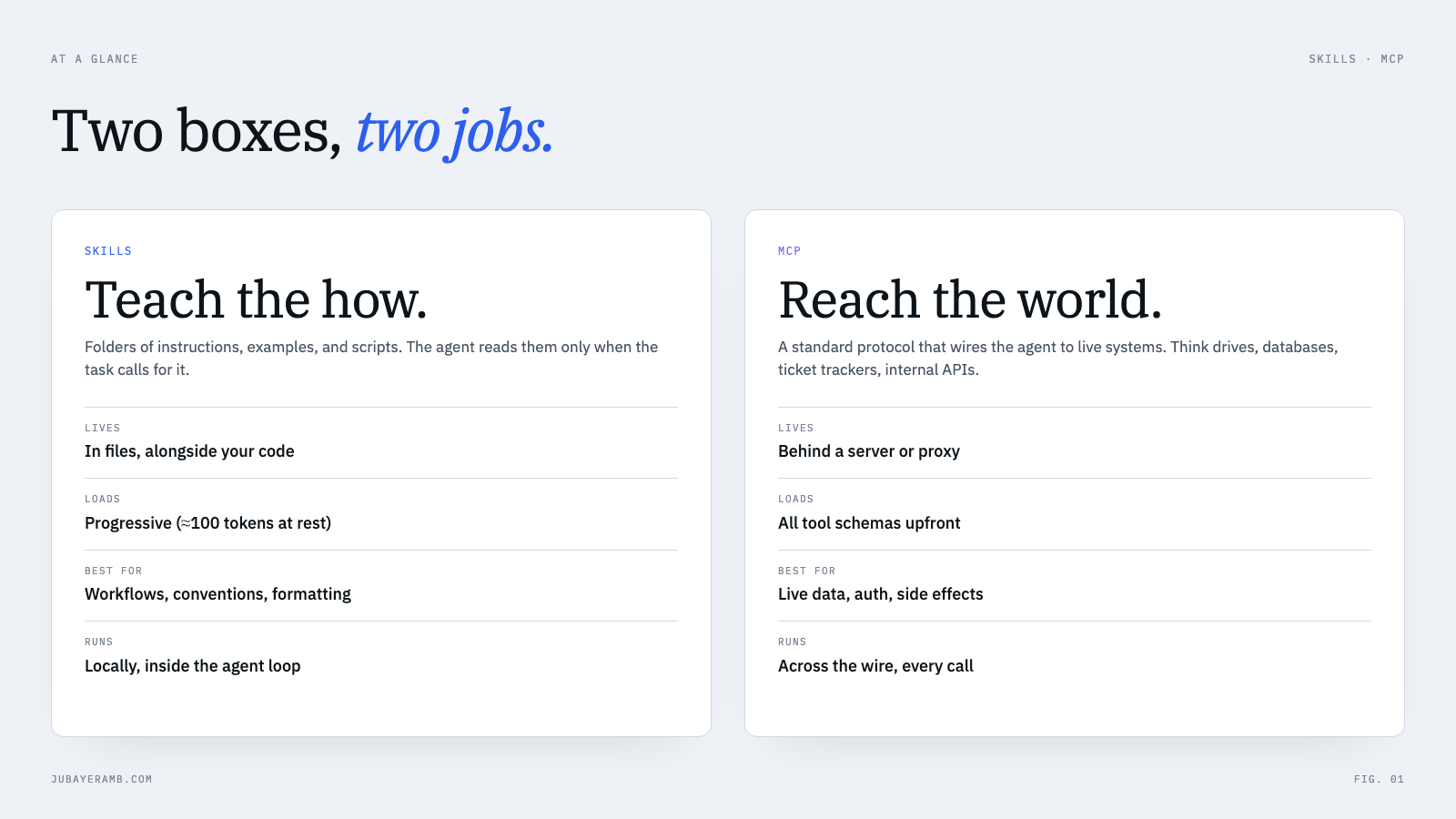
That single sentence covers most of the decisions you will make. The rest of this post is the why behind it, and the edge cases where the answer is “use both.”
What are AI Skills, really?
A Skill is a folder. Inside that folder is a SKILL.md file with some YAML metadata at the top, instructions in the body, and any extra files the agent might need. Templates, scripts, examples, a checklist.
A tiny one looks like this:
pr-review/
  SKILL.md
  checklist.md
  examples/
    good-pr.md
    bad-pr.md
The SKILL.md itself starts with a frontmatter block the agent reads at startup:
---
name: pr-review
description: Use when reviewing a pull request. Walks the checklist,
  flags risky patterns, and writes the review comment.
---

## How to review

1. Read the diff top to bottom.
2. Run through `checklist.md`.
3. For anything risky, point to a line and quote the file path.
4. Use the tone in `examples/good-pr.md`.
The smart part is what happens at runtime. The agent does not load every Skill into context. It loads only the metadata, which is a hundred tokens or so per Skill. When the user actually asks for a pull request review, the agent reads the body. If the body points to checklist.md, the agent reads that too. If it never needs bad-pr.md, it never opens it.
This is called progressive disclosure, and it is the reason a single agent can carry forty Skills without melting its context window. You can think of Skills as a filesystem-shaped library that the agent pulls from on demand.
A few things Skills are good at
- Conventions. “Always wrap currency in this helper.” “Never call this deprecated function.” “Always cite a line number when you flag a bug.”
- Multi-step workflows. “When the user asks to ship, run these checks in this order, then post in this Slack channel.”
- Output formats. Slide templates, email shapes, weekly digest format, code review comments.
- Domain knowledge. “Here is how our pricing model actually works. Here are the edge cases sales hits every month.”
Anything that you would write down for a new teammate is a candidate for a Skill.
What is MCP, really?
MCP, the Model Context Protocol, is a wire format. It is an open standard for an agent to talk to an outside system in a structured way. The agent is the client. A small server sits in front of GitHub, or Postgres, or Stripe, or your internal API, and exposes a list of tools the agent can call.
A tool, in MCP terms, is a function the server says it can run, with a JSON schema for inputs. The agent reads the catalog at the start of the session, decides “I should call search_issues with this filter,” and the server runs the call. The result comes back as a message the agent can keep reasoning about.
The win is reach. The model is no longer guessing what is in your Drive. It can search the Drive. It is not pretending to know your current quarterly numbers. It can run the query.
A few things MCP is good at
- Live data. Anything that changes faster than you want to bake into a prompt. Inventory, tickets, calendars, deal stages.
- Side effects. Sending the email, creating the ticket, deploying the branch.
- Auth boundaries. When the data is locked behind an OAuth flow or a service token, MCP is where you put that.
- Reusable across agents. One MCP server can serve Claude, Cursor, a custom agent, a future model you have not picked yet. Skills travel with the agent; MCP servers travel with the data.
The hidden cost nobody warns you about
Here is the thing nobody puts in the marketing posts. MCP is not free at runtime. Every tool the server exposes goes into the agent’s context as part of the tool catalog, every single turn.
Plug in three popular MCP servers (GitHub, a browser, an IDE) and you can burn a hundred and forty thousand tokens before the agent has done anything useful. There are real benchmarks floating around showing the same task taking four to thirty times more tokens through MCP than through a small CLI script the agent shells out to.
Skills sidestep this almost completely. The Skill index lives in a hundred-token shelf. The body only loads when the task calls for it. You can have a hundred Skills installed and your context stays trim.
This is not a knock on MCP. It is a planning constraint. When you reach for MCP, you are paying tokens for access. Make sure the access is worth it.
Is MCP worth it?
Yes, when the agent needs something it cannot get any other way. No, when you are paying for a tool catalog that a file or a one-line command would replace.
MCP earns its context cost when at least one of these is true:
- The data is live. The answer changes between Monday and Friday: tickets, inventory, a calendar, a deploy status.
- The agent has to act. It sends, creates, updates or deploys something on a system you do not own.
- There is auth in the way. OAuth, a service token, per-user permissions. The server holds the secret so the prompt never does.
- More than one client needs it. The same tools have to work in Claude, Cursor and your own agent.
It is not worth it when:
- The tool returns the same thing every time. A style guide, a lookup table, an API reference. That is a Skill.
- One command does the job. If the agent can run
gh pr listor a small script in a terminal, a Skill that tells it which command to run is cheaper than a server that exposes thirty tools. - You only ever call one or two tools. Every tool the server exposes still sits in context. Turn off the ones you do not use, or skip the server.
So the honest answer to “is MCP useful” is: very, for reach. For knowledge, it is the expensive way to do something a Skill does for almost nothing.
When to pick which, in 10 seconds
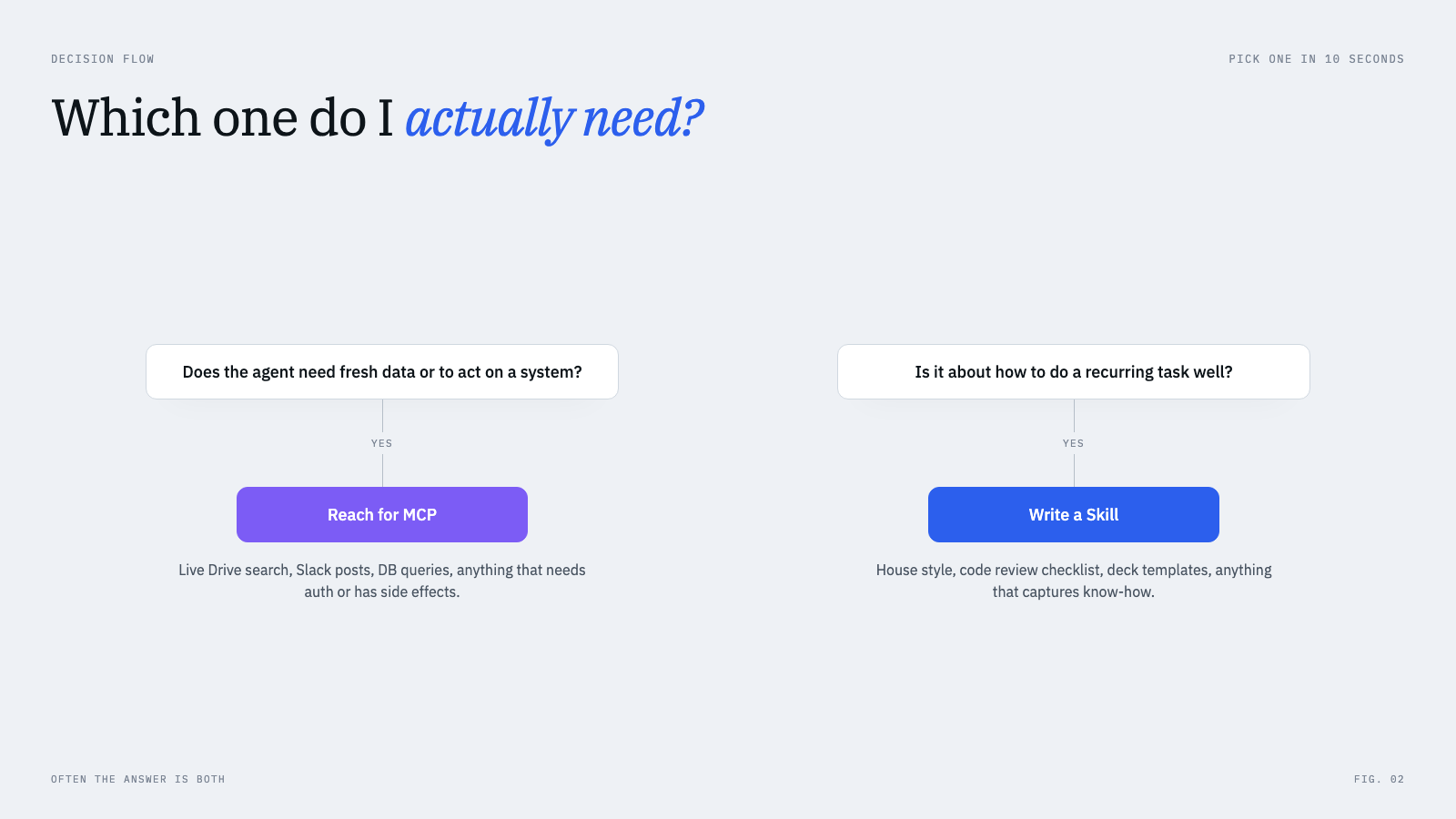
In practice, the question to ask yourself is short.
Does the work need fresh, external state or a side effect on a system you do not own? That is MCP. The agent must reach across a wire to do it correctly.
Is the work mostly about doing a recurring task the way your team does it? That is a Skill. The know-how is the thing you are missing.
Both? Yes, usually. Most real workflows are MCP for the verbs and Skills for the style.
MCP server vs Skill: which one should I build?
The question changes a little when you are the one building the extension, not just picking one.
Build an MCP server when:
- It needs credentials that should not live in a repo or a prompt.
- It talks to a live system over the network.
- Several different agents or apps will use it, and you want one implementation behind all of them.
- You want the server, not the model, to enforce what is allowed (read-only queries, rate limits, which tables it can touch).
Build a Skill when:
- The value is instructions, examples, templates or a checklist.
- A short script in the Skill folder can do the work, and the agent can run it.
- It only needs to work in the agents that support Skills.
- You want to change it by editing a Markdown file, not by redeploying a server.
If you are unsure, start with a Skill. It is a folder, so it costs nothing to try. Move the part that needs a key or live data into an MCP server once you hit that wall.
A small worked example
Say you want an agent that ships your weekly customer digest.
- It needs to pull this week’s signups from your warehouse. MCP. A small server exposes a
query_warehouse(sql)tool with read-only auth. - It needs to pull last week’s support tickets. MCP. Your helpdesk vendor probably already publishes an MCP server.
- It needs to write the digest in your house voice, lead with a number, end with one sentence about what is next. Skill. Drop a
weekly-digest/folder withSKILL.md, a tone guide, and three good past digests. - It needs to post the digest in the
#growthchannel and tag the owner. MCP. A Slack MCP server gives youpost_message(channel, body).
Notice how the seam falls. MCP shows up wherever the agent crosses a system boundary. Skills show up wherever the agent has to make a judgment call about how good the output should be.
Skills vs MCP in Claude Code
In Claude Code the two sit side by side, and the difference is easy to see on disk.
- Skills are folders with a
SKILL.md. Project Skills go in.claude/skills/<name>/and are shared through the repo. Personal ones go in~/.claude/skills/<name>/. Claude Code reads only each Skill’s name and description at startup, and loads the body when a task matches. - MCP servers are added with
claude mcp add, or listed in a.mcp.jsonat the repo root so the whole team gets the same servers. Their tools are available to the agent from the start of the session, which is where the context cost comes from.
A setup that works well: a project .mcp.json with the two or three servers the team really uses, and a .claude/skills/ folder for everything about how your team works.
The short rule I use
When I am about to wire something up, I ask one question. Is what I am giving the agent a recipe, or a key?
A recipe is a Skill. A key is MCP.
If it is both, the recipe goes in a Skill and the key goes behind an MCP server, and the agent picks them up at the moment it needs each one. That is the whole pattern. Once you see it, every new extension becomes obvious.
Skills and MCP decide what an agent knows and what it can reach. For the small decisions inside a workflow (classify, route, flag), I also wrote about Jev and System One Models, a model built to return those decisions directly.
If you found this useful, or you disagree with how I drew the line, I would love to hear about it. The fastest way to reach me is through one of the channels on the contact page, or you can chat about me on the home page (yes, it is voice-enabled now).
FAQ
What are AI Skills vs MCP, in one line each?
Skills are reusable instruction packs the agent loads on demand. MCP is a protocol that lets the agent talk to outside systems.
What is the difference between AI Agent Skills and MCP?
Same answer. Skills live in your repo. MCP lives behind a server. Skills carry know-how. MCP carries access.
Is MCP worth it?
When the agent needs live data, a side effect, or access behind auth, yes. When the tool only returns static text, or one CLI command would do the job, no: you pay for its tool catalog in context every turn and get nothing a Skill or a script would not give you.
Should I build an MCP server or a Skill?
Build an MCP server when the value is access: credentials, a live system, several different agents or apps that need the same tools. Build a Skill when the value is know-how, or when a short script plus instructions is enough.
Do Skills replace MCP?
No. They share an agent runtime but solve different problems. Skills cannot fetch a fresh row from your database. MCP cannot capture how your team writes a pull request comment.
Should I rewrite my MCP server as a Skill?
Only if the tool was never really fetching live data. A lot of "MCP servers" in the wild are static lookup tables that would be lighter and faster as a Skill. If you grep your server and it never reads from a network, it is a Skill in disguise.
Where do agents and subagents fit?
An agent is the runtime. Skills and MCP are two ways you extend it. A subagent is a way to spawn another agent run for a focused task, with its own Skills and MCP servers. Different layer of the stack.